

Web Plane Design: Basics and
Borders Method
Web 結構_網頁平面設計:基礎與邊框法
As a project leader, you want to moderate the interaction among websites in a web community and to develop a full-scaled structure that has a scope of whole picture than to design details.
 However,
according to previous experience, many students would have difficulties to
comprehend the complications. If you do not have a full vision in your mind yet, you may go to
'Website Structure' in the first place then
come back latter.
However,
according to previous experience, many students would have difficulties to
comprehend the complications. If you do not have a full vision in your mind yet, you may go to
'Website Structure' in the first place then
come back latter.
|
Web 結構包括3層涵義:網群結構、網站結構和網頁結構。網群結構為網站之間的連結,伺服器與後端資料庫的配置。網站結構包括虛擬結構-導覽設計,與實體結構-資料夾設計。網頁結構常用2欄或3欄式,平面設計與分欄方法過去包括邊框法、表格法、框架法,但當前以CSS法為優,必要時可搭配綜合法。頁面導覽,有從單導覽,往雙導覽、多導覽發展的趨勢。另有Pop-up Page立體空間之彈出網頁設計。 |
網頁命名優化 URL Slug
URL Slug 就是「結構純淨、安全防禦」的檔案命名標準。
1. 全小寫英文字母(Lowercase Only)
正確:popular-science-editorials
錯誤:Popular-Science-Editorials
某些
Linux 網頁伺服器(如 Cloudflare Pages 底層系統)對大小寫極度敏感。如果網址大小寫混用,未來維護時極易因為手誤打錯大小寫而集體噴出
404 找不到網頁的錯誤。
2. 字詞之間一律使用「半形連字號(减号 -)」
正確:universal-phenomena
錯誤(用空格):universal phenomena (在瀏覽器中會被迫轉譯成極醜的 %20 雜訊)
錯誤(用下底線):universal_phenomena
SEO 事實:Google 官方曾明確宣告,爬蟲只承認減號 -
為「斷字分隔符號」;如果用下底線 _,爬蟲會把 universal_phenomena 視為一個無法拆解的超長單字,進而喪失關鍵字權重。
3. 去除所有不必要的贅詞(Stop Words)與標點符號
Slug 的目的是精煉,不是造句。請把英文中的介系詞(a, an, the, of,
in, to)與驚嘆號、問號統統物理清洗掉。
不妥:suggestions-for-writing-research-and-revision(太長了,RWD 易溢出)
優化後的精煉 Slug:writing-research-suggestions
4. 保持絕對的語意誠實(與網頁 H1 標題咬合)
Slug 的關鍵字必須與您網頁內部的內容或 <h1> 大標題完全契合。如果網址寫 pop-science,內文卻全是古典文學,會被搜尋引擎視為惡意欺騙而降低評分。
Web Page Layout/ Plane Design 網頁平面設計
網頁結構常用2欄或3欄式,平面設計與分欄方法過去包括邊框法、表格法、框架法,但當前以CSS法為優,必要時可搭配綜合法。頁面導覽,有從單導覽,往雙導覽、多導覽發展的趨勢。另有Pop-up Page立體空間之彈出網頁設計。
邊框法只能配合800*600之解析度,已逐漸過時。框架法雖曾經盛行一時,但不利SEO之搜尋效果。實務上,有不少以表格法為基礎、CSS法為骨幹的綜合法。CSS法應是Web設計的優先選擇,也是未來趨勢。
The popular methods are: by border, by table/grid, by frame,
by CSS and by
hybrid.
The measurement of size could be fixed (by pixel) or liquid (by %) or
hybrid.
However, the CSS method (such as div)
may resolve conflicts since it is still under progressive development.
Resolution 解析度與網頁尺寸設計
網頁尺寸設計應與解析度(Resolution)有對應關係,統雄老師建議如下。
|
Resolution |
Suggested design width |
|
1024*768 |
960~1000 |
|
800*600 |
750~780 |
The 1280*1024 and 1680*1050 are coming.
 Warning: Borders Design is only good for 800*600 design. Go to the
Table/CSS Design for 1024*768 design and higher.
Warning: Borders Design is only good for 800*600 design. Go to the
Table/CSS Design for 1024*768 design and higher.
Borders Design
 SharePoint
It does not support 'Borders'.
FrontPage 2003 and after
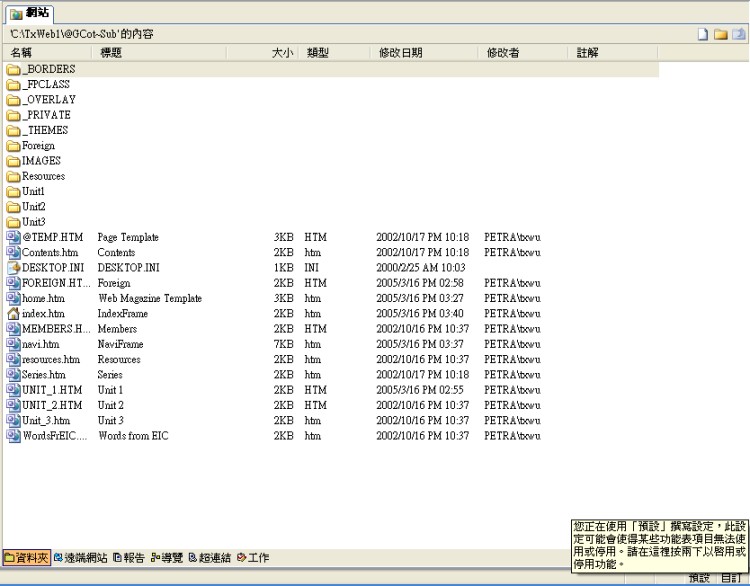
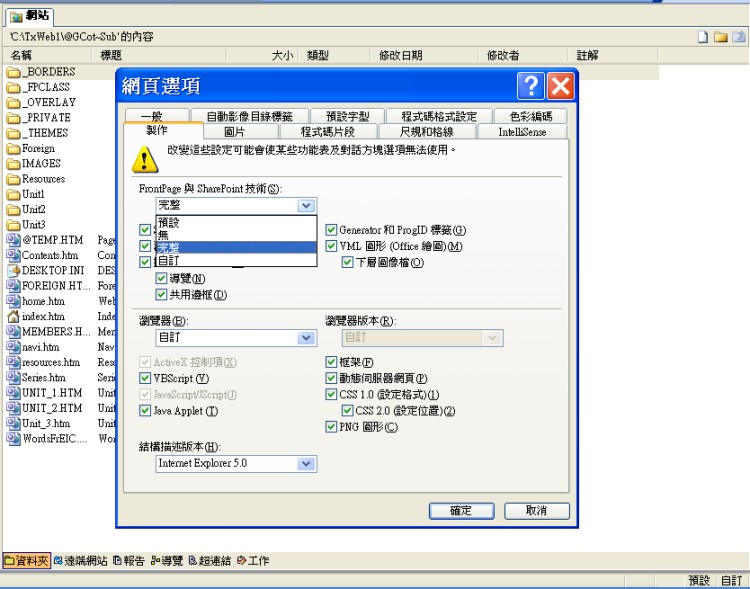
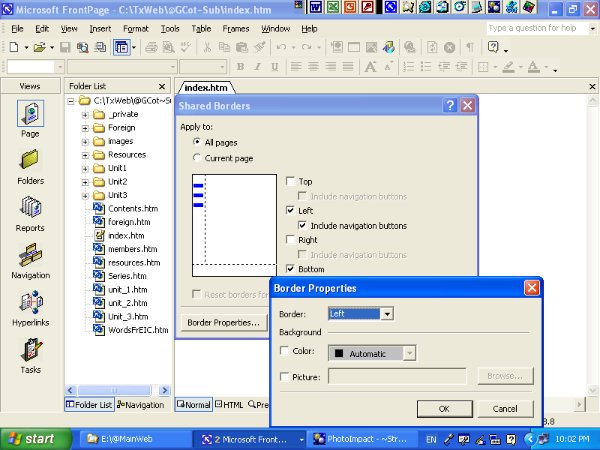
Format-Shared borders
Apply to: all pages.
Since the border lines create the visual divisions, we do not want too many lines.
According to the balance theory, we want the first main border line will be the vertical line more than horizontal line, unless you want to emphasize a very flat visual effect.
Check: include navigation buttons.
You can use the 'border properties' to modify the background. Remember, do not make your plane too busy, dizzy, and lousy.
 Advanced:
Webbot
Advanced:
Webbot
The syntax of 'borders & navigation links' is invisible in the <HTML> View. However, if you mark the navigation, the syntax will appear in the '<!--Webbot--> of tag window.
The syntax of default navigation is:
<!--webbot bot="Navigation" s-orientation="vertical" s-rendering="graphics" s-type="top" b-include-home="TRUE" b-include-up="TRUE" -->
The syntax of user defined navigation (as left.htm) is:
<!--webbot bot="Navigation" s-type="sequence" s-orientation="vertical" s-rendering="graphics" b-include-home="FALSE" b-include-up="FALSE" u-page="sid:1003" -->
home= home page
up= upper level
sid:
You have to find it by explorer: (it is invisible in FP)
>_borders
>_vti_cnf
>>(double click) left.htm
It displays as follows:
vti_encoding:SR|utf8-nl vti_author:SR|NTU-SEAN\\txwu vti_modifiedby:SR|NTU-SEAN\\txwu vti_timelastmodified:TR|02 Feb 2009 15:13:36 -0000 vti_It displays as follows:
vti_encoding:SR|utf8-nl vti_author:SR|NTU-SEAN\\txwu vti_modifiedby:SR|NTU-SEAN\\txwu vti_timelastmodified:TR|02 Feb 2009 15:13:36 -0000 vti_timecreated:TR|02 Feb 2009 13:45:13 -0000 vti_shadowfiles:VX| vti_title:SR|?梁撌行?蝺? vti_extenderversion:SR|6.0.2.8161 vti_backlinkinfo:VX| vti_nexttolasttimemodified:TW|02 Feb 2009 13:54:39 -0000 vti_cacheddtm:TX|02 Feb 2009 15:13:36 -0000 vti_filesize:IR|1610 vti_cachedtitle:SR|?梁撌行?蝺? vti_cachedbodystyle:SR| vti_cachedneedsrewrite:BR|true vti_cachedhasbots:BR|true vti_cachedhastheme:BR|false vti_cachedhasborder:BR|false vti_botnavbits:SW| vti_botlinkbars:VW|S|sid:1003 vti_botnavbarthemes:VR| vti_botnavbarfeatures:VR|s vti_metatags:VR|HTTP-EQUIV=Content-Type text/HTML;\\ charset=big5 vti_charset:SR|big5 vti_syncwith_tx.liberal.ntu.edu.tw\:80/fb:TR|02 Feb 2009 15:13:36 -0000
You will find the "sid".
Web Community Structure 網路社群結構設計
Website Structure 網站結構


