

MIME Type Management IIS, Remote, Server Management
IIS Specification 網路資訊服務簡介
IIS (Internet Information Server) 網路資訊服務管理,是伺服器對網站行為最重要的應用,IIS 的部署與測試,請參考統雄老師的 IIS介紹專文。
MIME 類型管理,隸屬於IIS管理功能之中。
其他的特殊檔案類型管理,也在本章介述。
 MIME Management
網際網路媒體類型
MIME類型(Multipurpose Internet Mail Extensions, MIME type),現在多改稱為網際網路媒體類型(Internet media type),或內容類型(content type)是網際網路上傳輸內容與檔案的分類記錄。
這樣的分類觀念最早是由電子郵件所夾帶的多媒體檔案需求而來,後來普遍化作為網際網路媒體類型的分類標準,由網際網路號碼分配局(IANA)發布。
一個MIME類型至少包括兩個部分:一個類型(type)和一個子類別型(subtype)。此外,它還可能包括一個或多個可選參數(optional parameter)。比如,
type="text/css" 表示類型為 text:子類別型為: css
type="audio/mpeg" 表示類型為 audio:子類別型為: mpeg
各種MIME類型必須在伺服器上註冊後,伺服器才會發送該種MIME類型。
伺服器上固然與預設MIME類型,但有些新出現的類型,譬如:.7z,伺服器上沒有,就必須新增。
This setting determines which .extension file names are able to upload to/ download from this server.
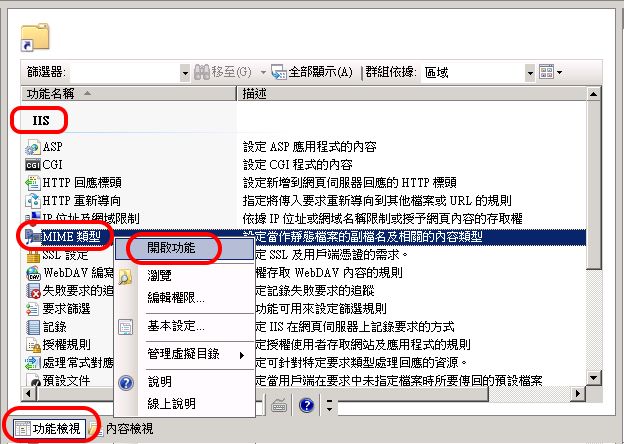
IIS 7 新增MIME類型
IIS 6 and Before 舊版新增MIME類型
>IIS - Right click >Property
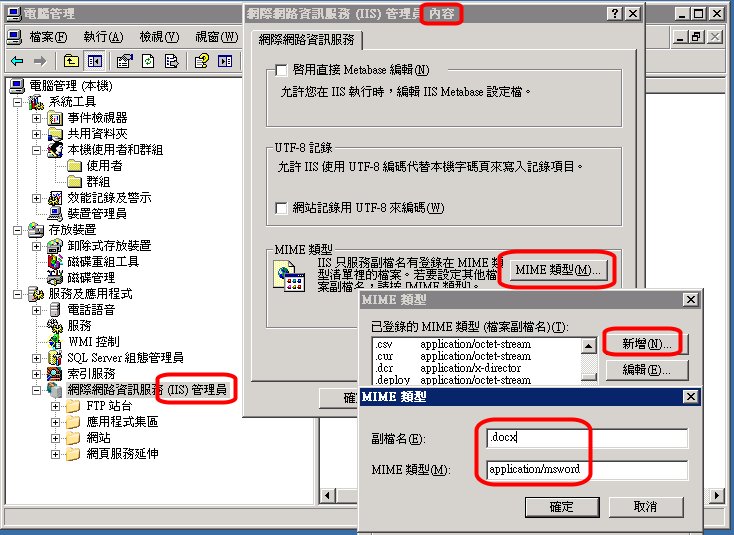
那裡找新增MIME類型
雖然有一些網頁,宣稱提供所有MIME類型,如
http://www.freeformatter.com/mime-types-list.html
但由於科技發展太快,還是有新增MIME類型未能及時收集。
 octet-stream 常用執行檔類型
由於執行檔通常都是以位元格式編碼,所以,對執行檔、或未知類型檔案,都可以嘗試使用:"application/octet-stream" 作為MIME類型。
A MIME type "application/octet-stream" is a binary file.
After IIS 6.0, you want to use this type for executable or
unknown file extension.
新增MIME類型「神掌解」:先壓縮
由於新增MIME類型,還是可能不適用"application/octet-stream" ,統雄老師還是提供一個萬用「神掌解」,即將該檔案先作為壓縮檔,如7z,就可使用伺服器傳送,到本機、或使用者端後再解壓縮,即可使用。
其他MIME類型重要資訊
 The items below must be added to the MIME type list:
Mime Extension: .dat, .exe, .upd, .zip, .mcs,
and .ini
Mime type: application/octet-stream
NOTE: Capitalization for extensions added to the IIS MIME type list must match the case of the file extensions on the ePO server where the Master Repository resides. If they do not, the files will not be copied to the IIS server where the Distributed Repository resides and the clients which access that Repository will not update correctly.
註:ePO server 是指 McAfee ePolicy Orchestrator (McAfee ePO) 是個開放式統一安全性管理 平台。
To
resolve this issue, make the following changes to the default
IIS 6.0 / 7.0 settings:
Launch IIS Manager.
Select Web Sites.
Right-click Web Site and select Properties.
Click the HTTP Headers tab.
Click MIME types.
Click New and type each of the entries below:
Extension: .mcs MIME type application/octet-stream
Extension: .log MIME type application/octet-stream
Extension: .ini MIME type application/octet-stream
Extension: .z MIME type application/octet-stream
Extension: .gem MIME type application/octet-stream
Extension: .upd MIME type application/octet-stream
Extension: .chm MIME type application/octet-stream
Extension: .pdb MIME type application/octet-stream
Extension: .rpm MIME type application/octet-stream
Extension: .key MIME type application/octet-stream
Extension: .bin MIME type application/octet-stream
播放清單
Extension: .wpl MIME type application/vnd.ms-wpl
Click OK.
Close IIS Manager.
NOTE: You must restart the World Wide Web Publishing Service or
wait for the worker process to re-cycle for the changes to take
effect.
特殊檔案類型與副檔名
特殊檔案類型與副檔名介述如下。
什麼是 .dmg 檔案
磁碟映像檔.(通常)自解執行檔
.dmg 副檔名的意思是 Disk image(磁碟映像),通常是 Mac 的檔案,如微軟的自解執行檔.exe。
磁碟映像顧名思義就是包含了一個磁碟裡面的內容、或是一個程式,命名方式如 overture.dmg,自解細節如以下連結。
http://download.cnet.com/Overture/3000-2170_4-48648.html
什麼是 .dmp 檔案 minidump files
偵錯轉儲檔


