

FTP Management Remote Management_Server Management
FTP Specification 遠端檔案傳輸簡介
FTP 是一種遠端檔案傳輸協定、類同一種應用程式。歷史攸久,而簡單耐用,當前各瀏覽器均有支援客戶端程式。
For remote file transmission, upload, download, and file management.
People used to operate local workgroup and remote workgroup by LAN and FTP. However, the two facilities have been abused and locked up by many public labs since their simple and convenient features.
This course has provided an advanced methods for remote management:
FTP with specified TCP port.
FTP 站臺設定
 Windows Server 2008 /
IIS 7.5
Windows Server 2008 /
IIS 7.5
新增FTP 站臺設定, 對公共的存取,SSL可設定為「沒有」。
驗證設定如下:

繫結
建立多FTP站臺,自配連接埠較簡便(相對於隔離式部署)。
唯自配連接埠經防火牆限定範圍為:4000-6000

Windows Server 2000 /
IIS 6 and
Previous versions
使用隔離式部署,可自配任意連接埠。


Using Major Browsers 如何在各種瀏覽器上設定與應用 FTP
IE 瀏覽器V11以後 專用FTP 應用
Ftp to the dedicated port
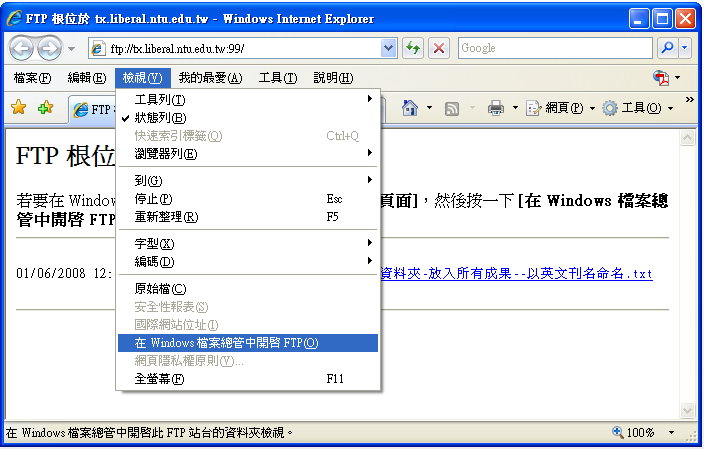
 注意:如果沒有出現命令列,按<Alt>可出現。
>檢視
>在檔案總管中開啟FTP
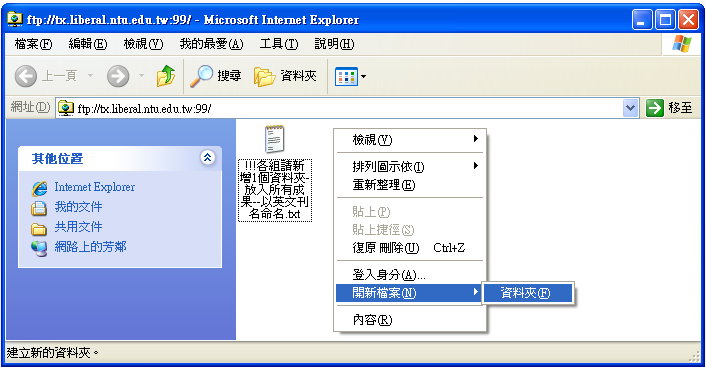
自動進入檔案總管,右點建立作品資料夾
Right click to open a folder for your works.
Create folds in English.
注意:必須以英文作為資料夾與檔案名稱!
則可以將本機的檔案,直接拖入FTP,並進行相關管理。
上傳後測試
網路版:
https://seantxwu.pages.dev/TxCG/GCot年度/刊名/
電子書版:
https://seantxwu.pages.dev/TxCG/GCotDTP年度/刊名/Book_name.pdf
Windows XP 介面
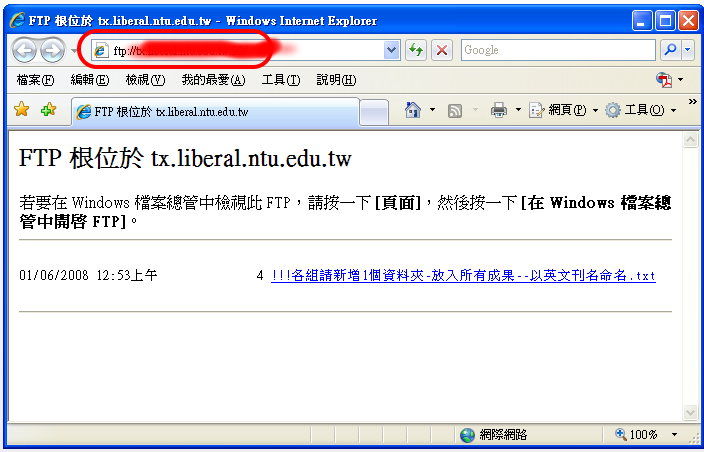
使用 IE9 FTP
For anonymous log in:
FTP://address
For members only log in:
FTP://name@address
For members only with specified TCP port log in:
If proxy makes a problem to connect to the FTP server, use FTP's IP instead of its domain name.
Current version

IE6 and
Previous versions
If there is no dialogue box, click right button, choose 'log in as'

Log in

Whether save your passwords?
Using your own personal computer- Yes.
Using a public PC- No.
Remote Download/Upload 下載與上傳
Right click: New folder

Rename: right click
Using 'copy-paste' put local folders, files into FTP site.
If there are many uses log in a FTP site in the same time, it is possible that error occurs. -Please wait for minutes.
Through FTP, space in the file name is not allowed for some servers.
 Practice: Upload Your Work
Warning: The FTP virtual address (for management) is different from the http
virtual address (for presentation).
Http address = https://seantxwu.pages.dev/TxCG/GCotyear/
使用火狐 Firefox FTP
Firefox 基本功能只能下載,如要上傳,必須外加元件。
〉工具
〉附加元件
〉取得元件
在本頁搜尋
建議使用 FireFTP
使用方法
〉工具
〉網頁開發者
〉FireFTP
使用谷歌 Chrome FTP
Firefox 基本功能只能下載,如要上傳,必須外加 Extension。
〉Web Store (空白頁時之右下角)
在本頁搜尋
建議使用 FTP Client
使用方法
〉圖示出現在右上自訂鈕旁。
注意:Extension 出現在此處,但 App 則出現在空白頁上。
新版已禁止在外站附加程式、元件,若要快速安裝,必須到Web Store。
使用 Expression Web FTP/ SharePoint FTP
File-Web Publish

Trouble Shooting
不能發布 .db 檔案
.db is easy to make a stop. Go to "View >Files to publish" and publish them one by one manually.

發布
UTF-8 檔案 出現錯誤的〈451
錯誤訊息〉
上傳檔案時出現:
451 No mapping for the Unicode character exists in the target multi-byte code page
理由:Windows Server 2008 內建的IIS 7.5 FTP, 因為預設允許使用 UTF-8, 但如果使用 Windows內建的檔案總管當成 FTP Client, 會發生無法上傳中文檔案的問題. 會出現如上訊息。
事實:當前(2012)可以完成上傳,只是錯誤訊息仍然存在。
過去解決方案:(目前沒有如此處理之必要性)
http://forums.iis.net/t/1163391.aspx
打開 IIS 7.5 FTP 進階屬性設定: 將 "允許 UTF-8" 設為 False。
 Advanced: FTP and HTTP
FTP and HTTP may have same physical location but different virtual name.
For example, you may upload your test files to the FTP site at:
FTP://cg@tx.liberal.ntu.edu.tw
Then, you will find out your test files appear at the 'presentation' cell of:
TxNeoRwd/RwdColorStoneee&web.htm
And the location directs to:
../../TxCG/EE%26Web/EW03-1/test/
Another example, the following address could point to a same place.


