
圖文框設計:圖片/
 Web Design:
Blocks - Epistemological/Digital Aesthetics
- Formation Methodology
Web Design:
Blocks - Epistemological/Digital Aesthetics
- Formation Methodology
網站/網頁設計:圖文框實作-知識美學/數位美學之建構方法
Blocks include pictures, tables and other objects such as shape and border, division, inline frames, embedded maps, photo gallery... etc.
 RWD 設計神掌
 背景圖片內嵌文字範圍
<div class="w3-display-container">
<div class="w3-display-middle" style="width:90%"
title="統雄網群 TX Web Community" id="banner"></div>
<!-- #BeginEditable "banner"
-->Banner
<!-- #EndEditable -->
</div>
若不設 width,預設為
50%,會造成在手機上呈現不足。
背景圖片內嵌文字區域
字色可 w3-text-yellow 預設。但與 style 的 yellow 並不相同。
左右位置,注意上節之「文字範圍」,適當縮小,以免超出。
<div class="w3-display-container w3-text-yellow">
<img
src="../!TxTemp/SeanTX_ColorStone_ani.gif" alt="背景圖片內嵌文字區域"
style="width:100%">
<div class="w3-display-topleft w3-container"><p>Top
Left</p></div>
<div
class="w3-display-topright w3-container"><p>Top Right</p></div>
<div
class="w3-display-bottomleft w3-container"><p>Bottom Left</p></div>
<div
class="w3-display-bottomright w3-container" style="width:30%"><h6
class="tb-0" style="color:yellow">原址: tx.liberal.ntu.edu.tw</h6></div>
<div class="w3-display-left w3-container"><p>Left</p></div>
<div
class="w3-display-right w3-container"><p>Right</p></div>
<div
class="w3-display-middle w3-large">Middle</div>
<div
class="w3-display-topmiddle w3-container"><p>Top Middle</p></div>
<div
class="w3-display-bottommiddle w3-container"><p>Bottom Middle</p></div>
</div>

Top Left
Top Right
Bottom Left
原址: tx.liberal.ntu.edu.tw
Left
Right
Top Middle
Bottom Middle
Picture Files: An Overview
圖片格式概論
與圖片有關的中英文名詞相當混淆,統雄老師的文創系列用「圖片 Picture」涵蓋「美工繪圖 Graphic」與「影象照片 Imaging」2種類型。「美工繪圖 Graphic」包括靜態的「美工圖 Graphic Art」與動態的「動畫 Animated Graphic」;「影象照片 Imaging」包括靜態的「攝影 Photo」與動態的「視訊 Video」。
圖片的檔案格式,在視覺設計、與資訊技術上的相關議題,詳見連結。
美工繪圖 Graphic
美工繪圖 Graphic 是指人為使用各種媒體工具所繪製的圖片,通常強調線條感。
We have some ambiguous terms here. Generally, graphic refers to man-made, artificial art work. It emphasizes the outline of the picture and is saved in the file such as .gif.
影象照片 Image
影象照片 Image 是指使用各種攝影工具所捕捉實際存在物體形象的圖片,通常強調色彩感。
Again, generally, image refers to the real record of natural sight. It emphasizes the color of the picture and is saved in the file such as .jpg.
圖片掃瞄之解析度設定
圖片掃瞄如果日後要提供印表機印出,其解析度設定必須先在掃瞄器端設定為 200 dpi。
圖片掃瞄如果預試在螢幕、網路輸出,其解析度為72 dpi,日後輸出為印刷品,將有問題。
美工繪圖設計與創作 Graphic Drawing
識別系統與LOGO標誌設計 Identity System and Logo Design and Practice
含圖示設計、數位美工手繪設計
數位相片設計與創作 Picture Taking
攝影設計 Digital Photo Design
網頁圖片處理
圖片匯入 File-Import
 右鍵下載左側練習圖。
或至以下教材連結,下載各種檔案格式合法的圖片。
Exercise: Down load and import pictures from tx.liberal.ntu.edu.tw/MediaFiles
下載 5 張以上圖片,作為以下網頁圖片處理的練習。
如果已經有同步完成的個人化圖片,則可以直接使用個人化圖片。
It is a better method to include your pictures or other files into your web.
圖片資料夾管理 Picture Folder Management
所有圖片應集中在單一資料夾中,以利管理。
After editing your pictures, save it to a specific folder such as 'image'. It will be easier for common uses and further management.
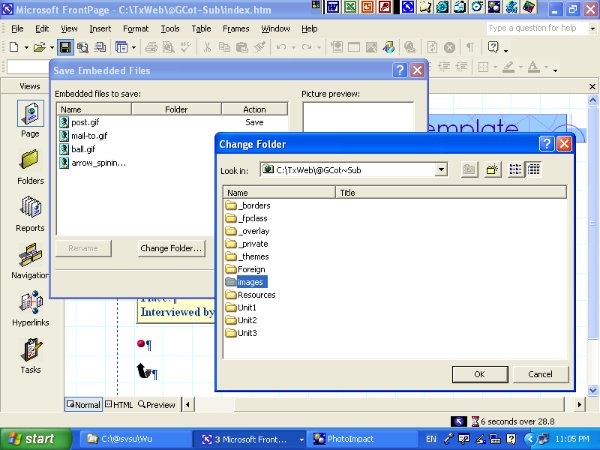
插入圖片與設定屬性
將圖片插入頁面時會顯示「替代文字」框,在框內填入圖片說明。完成之程式如:
<img alt="替代文字" " src="插入圖片之路徑">
圖示或縮圖放大
有時會把圖片的縮圖作為圖示,如有需求、也可以放大。
右鍵〉圖片屬性
〉外觀
〉文繞圖:靠左
〉指定大小:寬 58 px
alt and title 圖片的說明與跳出注解
可以手動加入alt and title。
alt="TX社群標章" 此為當圖片無法顯示時,圖片的說明。
title="TX社群標章 " 此為 tooltip text,對定位文字或圖片的說明與跳出注解。
程式碼為:
<p>
<img
alt="TX社群標章" title="TX社群標章" src="../../-cache/TxComm.gif"
style="width:58px; height:51px" class="border0"/></a></p>
到瀏覽器中預覽:
點選以下圖示以觀察其應用,同時注意「跳出注解 」效果。
 Tip: Show the original or another size of a pic.
Click the minimized icon and choose _blank. It will result the original size in another window.
data-src 自訂屬性
在有些網頁程式中,img 標籤中會看到 data-src,這是自訂 data-* attribute 屬性的一種應用。
data-src 係配合 java 應用,與 src 無關。
圖片工具列 View-Toolbars-Pictures
精細的圖片製作,應使用專業影象處理軟體。
圖片工具列,常用的為剪裁、簡單編修、重新取樣。
另在「影象地圖」單元,會教授區域範圍與連結。
The toolbar will pop-up automatically when you click a graphic or image.
It is convenient to decide the position of graphics by FrontPage.
However, it is better to process the graphics by another professional software prior to include your graphics into the web. It is also good for your web's efficiency and keep the originals of your graphics.
加入個人化主圖、頂圖、橫幅方法
請使用教材檔案練習。
 圖文框定位進階
Advanced
Settings of Positions
圖文框定位進階
Advanced
Settings of Positions
圖文框定位有 5 種定位,對單一圖片差異不大,但對重疊圖層影響深遠。
Static: 靜態位置/預設
An element with position: static always has the position the normal flow of the page gives it (a static element ignores any top, bottom, left, or right declarations) .
預設狀況,即跟著前後物件物件上下移動,一般不設。如果設了,就是把其他的 Positions 設定取消。
Absolute: 絕對位置
An element with position: absolute is positioned at the specified coordinates relative to its containing block. The element's position is specified with the "left", "top", "right", and "bottom" properties.
對「外包的區域元素」(如 div)其邊界的絕對座標位置,也就是對外包元素,始終不動,使用的座標是左上右下。也因此,只要在外包元素內,放在程式任何一段均可。如果沒有外包元素,就是對整個頁面的位置。
使用圖層工具拉圖層時,預設均為絕對位置。但是,使用絕對位置,一定會和不在圖層內的物件產生重疊。對初學者而言,除非是作背景,否則非常困擾。
Relative: 相對位置
An element with position: relative moves an element relative to its normal position, so "left:20" adds 20 pixels to the element's LEFT position.
對「鄰近的區域元素」至其邊界的距離,所以在程式中不能隨便移動。
相對位置在頁面上比較穩定,不怕前後文修改,是重疊圖層較佳的選擇,只是要在拉出圖層後,先改為相對位置、再重調整,手續較多,請參見進階說明。
Fixed:
固定位置
An element with position: fixed is positioned at the specified coordinates relative to the browser window. The element's position is specified with the "left", "top", "right", and "bottom" properties. The element remains at that position regardless of scrolling. Works in IE7 and after (strict mode) .
對瀏覽器而言的固定位置。使用在頁面捲動時,仍有必要持續顯示提示者。通常為小範圍,避免影響其他主題。譬如本網站的分類目錄:
Example: Table of Contents
語法是:
<div style="position:fixed;">
Sticky: 黏著位置
An element with position: sticky; is positioned based on the user's scroll position. A sticky element toggles between relative and fixed, depending on the scroll position. It is positioned relative until a given offset position is met in the viewport - then it "sticks" in place (like position:fixed).
背景圖片 Background Picture
背景圖片 Background Picture 是指全頁面的底圖,通常也是「視覺識別標幟系統」之一,且常為四方連續圖。
.CSS 檔案 + dwt 範本法
使用.CSS 檔案 + dwt 範本法,僅需在範本工具夾內:
!TXTemp
更換背景圖片:
TxBackG.gif
該工具夾內,目前提供了黃、與綠的 2 個背景圖片。
更多可分享之背景圖片樣本:
 單頁設定法
單頁設定法
在各單頁設定背景圖片,除非特殊目的,不建議使用。
右鍵〉網頁屬性
〉設定格式
注意:如果呈現「不可使用」之灰色,表示已設定在 css 中。
EW/SP support flexible user defined theme. However, you have to do it separately.
The following is for the background.
To add background, right click the page:
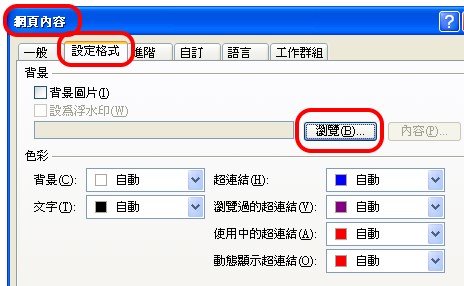
Or, you may manually insert the syntax as:
<body style="background-image: url('path/folder/name.gif')">
 Use
lighter/simple backgrounds for pages of reading while dark/busy backgrounds are
only good for ads or special reasons.
Use
lighter/simple backgrounds for pages of reading while dark/busy backgrounds are
only good for ads or special reasons.
網頁影象處理相關講義 Image Processing Readings
視覺設計/數位攝影/數位美工 Visual Design/Digital Photo/Digital Clipart
More Advanced Skills of PhotoImpact
向量圖 Vector Graphic
Statistics Diagram
動畫 Animated Graphic
Animator Practice
Convert data into visual presentation


