

網頁表格設計與多元應用
表格/
 Web Design:
Blocks - Epistemological/Digital Aesthetics
- Formation Methodology
Web Design:
Blocks - Epistemological/Digital Aesthetics
- Formation Methodology
網站/網頁設計:圖文框實作-知識美學/數位美學之建構方法
Blocks include pictures, tables and other objects such as shape and border, division, inline frames, embedded maps, photo gallery... etc.
Tables: Multifunction 網頁表格的多功能
Advantages: Space Allocation and Objects Integration
表格的多功能包括:空間規畫與物件整合。
-Dividing, shading, and mosaicking space.
-Designing the positioning, alignment of text, graphics and all objects.
Webpage Table Design 網頁表格設計
在 Html5 時代,宜先以CSS設計表格的視覺風格,實現套用表格樣式,與表格標題設計、表格欄位標題設計、表格與文字互轉。
以網頁編輯器的物件導向設計法,視覺設計的彈性與風格控制性較低。
Table Design with CSS 使用CSS 網頁表格設計
使用CSS網頁表格設計,常用的屬性與設定值設計方法如下。
更多範例,可參考 tx-14.css 範例檔。
General border design
.border1 {border: 1px solid #FFCC66;}
or
.border1 { border: 1px solid #FFCC66; font-family: Times New Roman; font-size:
14pt; text-align: left; vertical-align: top; margin: 0px; }
In this case, you do not have to specify the style for the cell contents.
Table Design: class and style 網頁表格類別與樣式的應用
網頁表格屬性class and style的應用,如以下「單元目錄設計」的範例。
在網站各單元,每單元可以設計一個簡易目錄。
表格設計快訣
表格設計快訣,可以提供快而豐富的技巧。
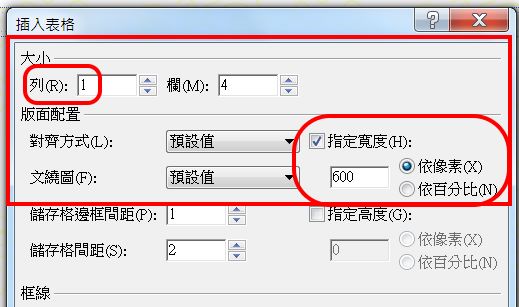
>Table-Insert 插入表格
只設定紅框中項目,其他由CSS設定。
不論幾列,先設1列。
在 Html5 時代,強調視覺設計控制,故都依 px 指定寬度。
<文繞圖>視需求,是否調整。
〉套用樣式
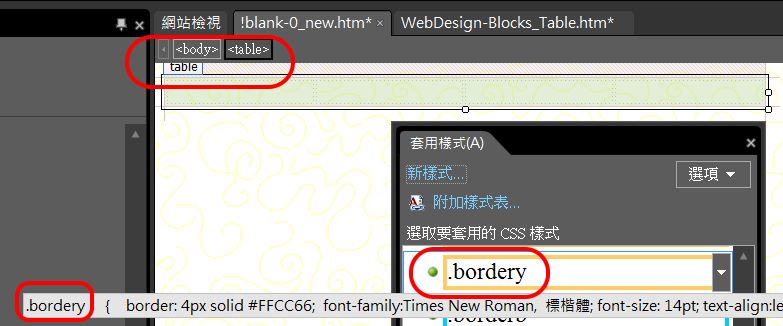
點選〈table〉標籤後,套用表格樣式。
所選的樣式 class,會出現 CSS 提示。
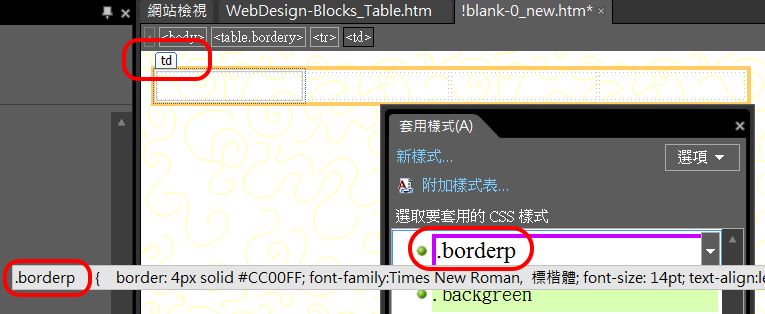
再點選〈td〉標籤後,套用不同表格樣式。
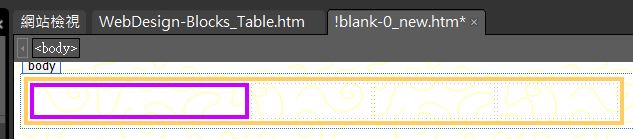
設計介面的顯示結果。
〉程式碼
轉〈程式碼〉介面,複製並取代〈td〉標籤。
可在此複製列 〈tr〉,或到〈設計〉介面,直接以右鍵插入列。
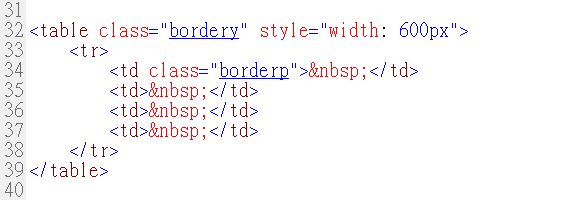
以上的示範,強調視覺效果。
但真正的「單元目錄」不必太華麗,以下的單純設計較佳。
如果單元內的文章小於4,可以更簡單,就不必再加簡介與視覺輔助了。
請參考「知識美學」建議:美來自「對比」,不是所有的物件都求眩。
<caption> table 表格標題設計
表格標題、與表格欄位標題設計,必須在〈程式碼〉以手動設定。
如果表格有標題,則在<table>之後,立即設<caption>。
<caption>預設為內文、表格置中。
預設之<caption>可以使用 css 修改,通常改設為標題。
<th> table header 表格欄位標題設計
如果表格欄位有標題,則將第一列之標籤設為 <th>。
<th>預設為內文加粗,細格置中。
如果有列標題,設計相同。
預設之<th>可以使用 css 修改,必要時,也可採進階的巢狀應用。
Usage of class and style to format tables
網頁表格設計CSS程式碼範例
使用 class 設計通用的樣式,如邊界、色彩、預設字型等。
使用 style 設計決定個別的度量,如寬度、高度等。
<table class="border1" style="width: 100%"><caption>
<h4>Table of Contents 目錄</h4>
</caption>
<tr>
<th class="border1" style="width: 21%">
Title 標題
</th>
<th class="border1" style="width: 20%">
Author 作者
</th>
<th class="border1" style="width: 20%">
Note 簡介
</th>
<th class="border1" style="width: 40%">
Visual Assistance 圖解
</th>
</tr>
<tr>
<td class="border1" style="width: 21%">
<p class="tb-0">Link to article page</p></td>
<td class="border1" style="width: 20%">
<p class="tb-0">May link to personal page</p></td>
<td class="border1" style="width: 20%">
<p class="tb-0">Brief attraction to audience</p></td>
<td class="border1" style="width: 40%">
<p class="tb-0">Classified icons or a part of
main pictures.</p></td>
</tr>
</table>
以上程式碼的瀏覽結果如下。
The result is as the table in the following "Contents Design".
| Title 標題 | Author 作者 | Note 簡介 | Visual Assistance 圖解 |
|---|---|---|---|
|
Link to article page |
May link to personal page |
Brief attraction to audience |
Classified icons or a part of main pictures. |
 If you choose a setting other than the default, such as 'border collapse', Expression Web/ SharePoint
will automatically add a system defined '.style1' into existing <style> tag,
etc. While FP will make it as embedded syntax.
If you choose a setting other than the default, such as 'border collapse', Expression Web/ SharePoint
will automatically add a system defined '.style1' into existing <style> tag,
etc. While FP will make it as embedded syntax.
<style type="text/css">
.style1 {border-collapse: collapse;}
.style2 {border-style: solid; border-width: 2px;}
</style>
表格與文字互轉
所有微軟的 office 軟體,都具備表格與文字互轉功能。
跨軟體表格與文字互轉
如果要將 Word 的表格,以網頁編排,不宜直接複製、貼上,而正確處理程序如下:
1. 先在 Word 內將表格轉為文字。
2. 淨化 Word 格式。成果如下:
, 文書, 資料庫, 試算表, 繪圖, 通訊, 其他
當前, 80, 8, 7, 3, 1, 2
未來, 80, 8,
7, 33, 71, 2
3. 再將其檔案在 EW 內轉為表格。
先「全選」以上純文字。
〉表格
〉轉換
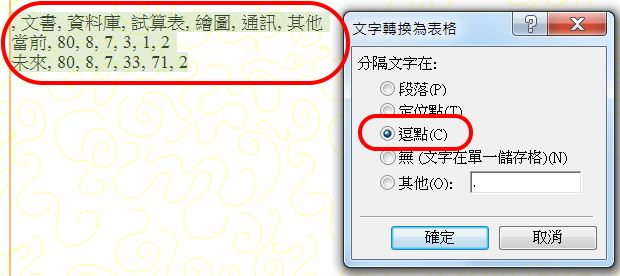
成果為以下無格式表格。
| 文書 | 資料庫 | 試算表 | 繪圖 | 通訊 | 其他 | |
| 當前 | 80 | 8 | 7 | 3 | 1 | 2 |
| 未來 | 80 | 8 | 7 | 33 | 71 | 2 |
 表格
css 意外錯亂
表格
css 意外錯亂
在〈設計〉檢視下修改表格格式,會影響「表格作為內置網頁」時,預設 .css 之 class。
亦即 EW 會自動產生 internal css,而優先於 .css 檔案。
表格 css 意外錯亂範例:
<td class="border1"> 未設寬度
在〈設計〉檢視下修改表格寬度
EW 會自動產生:
.auto-style1 {
border: 1px solid #FFCC66;
font-family: "Times
New Roman", 標楷體;
font-size: 20px;
text-align: left;
vertical-align : top;
margin-top: 0;
margin-bottom: 0;
width: 64px;
}
該表格在獨立顯示時,沒有問題。
但作為「內置網頁」時,會發生錯亂。
修正方式:
在程式中,加入寬度,如:
<td class="border1" style="width: 64px">
 <thead>,
<tbody>, <tfoot>
跨頁表格設計
<thead>,
<tbody>, <tfoot>
跨頁表格設計
css 有支援大型跨頁表格設計的標籤,不過一般需求較少。
 若有必要使用,請按此<thead>,
<tbody>, <tfoot>連結。
若有必要使用,請按此<thead>,
<tbody>, <tfoot>連結。
Text Box 插欄設計
插欄是作為「提示」、「強調」、增加趣味非常好的物件。
作為短「提示」時,內文通常使用提示樣式,並不留列間距。
Text box is a good idea to protrude another short article which is relevant to the main body. It is also a good idea to indicate a specific element of a standard writing structure.
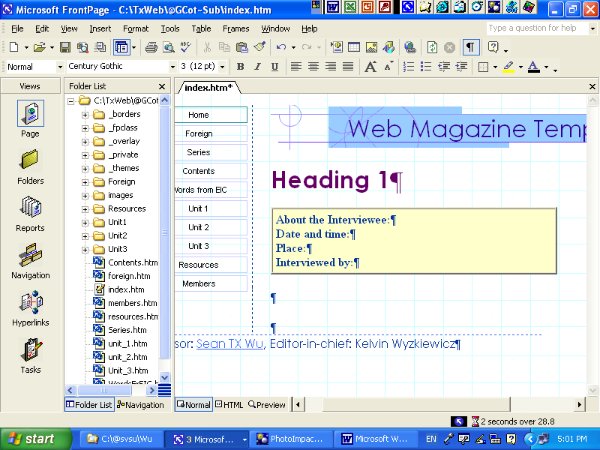
Text Box is a 1-row, 1-column table with specified borders and background.
Generally, the text in the box does not have margins.
Invisible Columns 多欄版面設計
Readability/ Space Efficiency |
Visual Simplicity |
|
The first reason you want to create columns is the 'readability' of avoiding fatigue after long reading. According to the result of past recognition experiments, it suggests the best length of a row for reading is between 10 to 50 characters. Since a standard screen length is 80 character wide, it will be a good idea to separate your article into columns, if you have a very long text. Columns will save space as well, if you have many short paragraphs. |
The second reason you want to use columns is you do not want your plane space looks too busy. There is a criterion for deciding whether you want visible lines and grids or invisible ones. If you have many broken pieces of objects, use visible lines. If you already have physical lines or virtual lines which are aligned by solid object, do not put more lines. Do not let 'line over line', 'grid beside grid' and 'frame next frame' happen. |
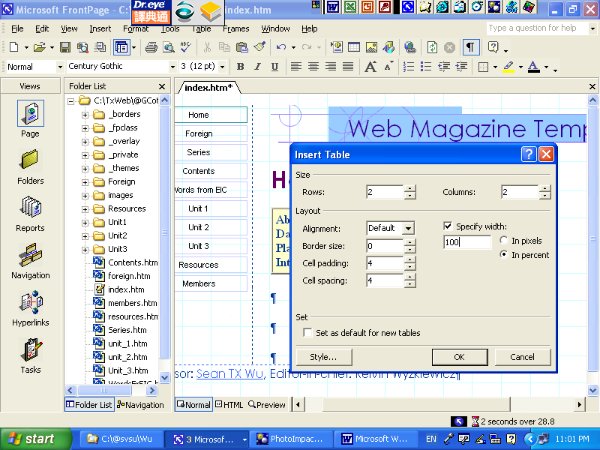
>Table-Insert-Border 插入 2 欄表格
The tip of invisible column is setting the border as '0' of a table.
For invisible column, design a larger cell padding and cell spacing.
It is recommended to create your columns by table more than by frames.
視覺增益與程式碼修訂
輸入標題、文字完成。
在〈設計〉介面,以滑鼠點選,出現<table>標籤。
〉套用樣式
選擇 .backgreen
以上設計,會使得欄間很密合,解決方案,是在<td>加入 style 的宣告、 padding-right 屬性、與適當的值,如以下程式碼。
<table class="backgreen" style="width: 100%; " id="Invisible1">
<tr>
<td style="width: 50%;" class="border0" >
<h4>
Readability/ Space Efficiency</h4>
</td>
<td style="width:
50%" class="border0">
<h4>
Visual Simplicity</h4>
</td>
</tr>
<tr>
<td style="width: 50%;
padding-right:14px;" class="border0" >
The first reason
you want to create columns is the 'readability' of avoiding fatigue
after long reading.<br>
According to the result of past recognition experiments, it suggests
the best length of a row for
reading is between 10 to 50
characters. <br>
Since a standard screen length is 80 character
wide, it will be a good idea to separate your article into
columns, if you have a very long text.<br>
Columns will save
space as well, if you have many short paragraphs.<br>
</td>
<td style="width: 50%;
padding-right:14px;" class="border0" >
The second reason
you want to use columns is you do not want your plane space looks
too busy.<br>
There is a criterion for deciding
whether you want visible lines and grids or invisible ones.<br>
If you have many broken pieces of objects, use visible lines.
If
you already have physical lines or virtual lines which are aligned
by solid object, do not put more lines.<br>
Do not let 'line over
line', 'grid beside grid' and 'frame next frame' happen.<br>
</td> </tr>
</table>
CSS 多欄版面設計
CSS 多欄版面設計,目前各瀏覽器尚未統一支援。
各瀏覽器還必須指定不同前置命令,如:
-moz- 火狐
-webkit- Chrome
CSS3
Property: background-image
CSS3 網頁表格屬性背景圖片設計與應用
CSS3 網頁表格屬性背景圖片設計,一定必須用 style方法,如以下程式碼的設計與成果:
<table style=" width: 100%; height: 70px; background-image:
url('../!TxTemp/TxBanner.gif');" class="center" id="table1">
<tr><td><p><span class="banner-text">橫幅標題</span></p>
</td></tr>
</table>
|
CSS2
背景圖片設計與阿帕契伺服器
CSS2 background-image and Apache HTTP Server
在CSS2 時代, 網頁表格背景圖片設計一般是以類別別別class方法為準,如以下的橫幅區塊設計:
<table style="width: 100%; height: 85px;" class="banner">
<tr><td><p class="banner-text">Blocks: Tables</p>
</td></tr>
</table>
其中之類別class為.banner,宣告如下:
.banner { background-image: url('txbanner.gif'); text-align:center; }
但在阿帕契伺服器(至少2.2之前)上,即使是 CSS2,應用class作網頁表格背景圖片,還是會發生無法顯示的錯誤,必須改用上節 style方法,
Tables Advanced Applications and Objects Integration 網頁表格進階應用與物件整合


