

爵士樂譜/導引樂譜設計實作 Lead Sheet Design and Practice
Chords Window and Chord Input //Tools Panel-Chords Section
|
音樂五要素
:旋律、和聲
(和弦,
對位)、節奏、配器 、曲式。 加上數位科技。 |
爵士樂譜/導引樂譜設計實作
Lead Sheet Design and Practice
V5 :工具控制版-和弦區
左上>工具控制版組 Tools Panel
>和弦控制區 Chords Section
增加了吉他的「指法圖形 guitar tuning」。
但必須改為用鍵盤、手動輸入和弦。
>Chords
 游標呈現「+」形。如果沒有呈現,按其他介面(如
>Lyrics),再回到 >Chords。
游標呈現「+」形。如果沒有呈現,按其他介面(如
>Lyrics),再回到 >Chords。
游標移至音符上方,出現「輸入框」,輸入後,按 <space>,自動跳到下一個音符。
警告:不可在空拍
track 上標和弦。
如吉他獨奏時,主旋律為空拍,會造成吉他 track 的顯示混亂。故必須標在吉他 track 上!
解決方案:在V4 將其他聲部,作為主旋律的第二 Voice,使和弦有對應旋律。但在 V4 改字型,轉到 V5 仍不相容。
警告:V4
可在多
track 上標和弦,但轉到 V5 會出現亂線條。
故V4 轉到 V5 之前,必須先刪除非主旋律 tacks 上的其他和弦!
V4 的和弦視窗
爵士樂譜/導引樂譜設計實作以Overture 的 和弦視窗為例。
「和弦視窗」最重要的就是提供和弦設定,而且可以提供一般文數字和弦設定,以及「吉他和弦指法」檢視設定。
「和弦視窗」不可以和「歌詞視窗」同時開啟。
Use the Chords window to put chord names and guitar frames in the
Score window. To open the Chords window, choose
The Chords
window cannot be open at the same time as the Lyrics window. If the
Lyrics window is open when you choose Windows>Chords, the
Lyrics window closes automatically.
Windows>Chords Window 開啟和弦視窗
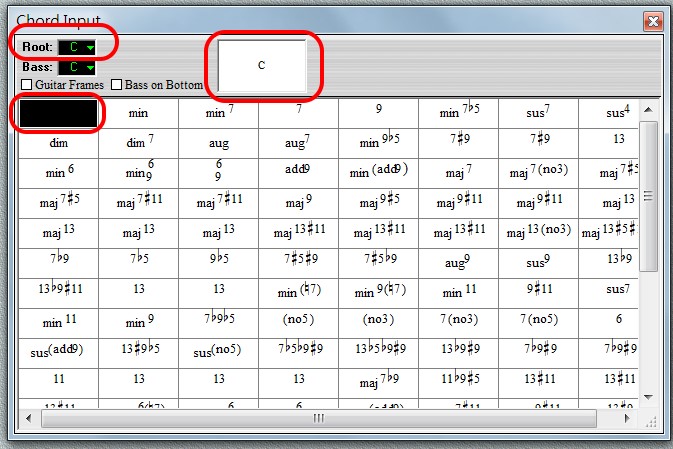
設定根音/調名 Root
>Root
可展開選擇根音/調名,假設為 C。注意:這裡的「根音」,是指「調名」,不要與「低音 Bass」-在和弦進行中,經常也稱為「根音」-互相混淆。
左上角黑框,表示為基本三和弦。
中上「和弦名稱」框,出現「 C」。
It’s important to understand the different terminology associated with naming chords. Specifically:
- Chord. This is the actual notation of multiple notes as shown on the staff in a score.
- Chord Name. This is the alphanumeric name of the chord as written above a staff to indicate which chord to play.
- Chord Root. This is the fundamental note of the chord, or its root position.
和弦與音符配對
點選黑框後,總譜上出現「和弦設定」游標,將其移到欲配對的音符上,點擊,上方即出現「和弦名稱」。
點選「和弦名稱」,可調整其空間位置、或與其配對的音符。
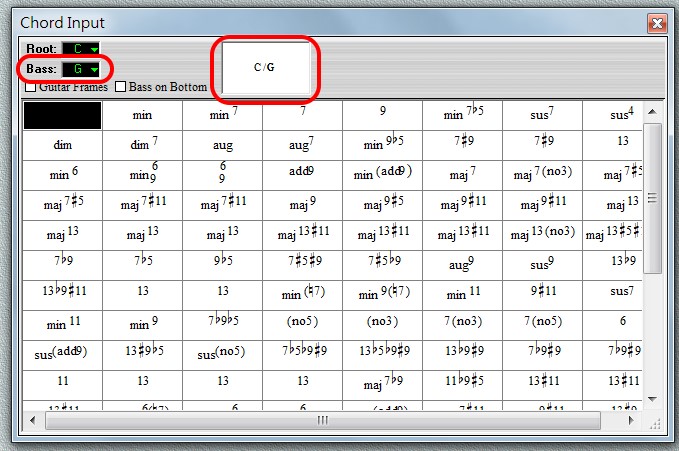
設定低音 Base
>Base
和弦進行設計,有時最「低音 Bass」非「根音」,如下例。
- Chord Bass. This is an additional pitch added to a chord name that indicates a note other than the root is the lowest pitch in the actual chord.
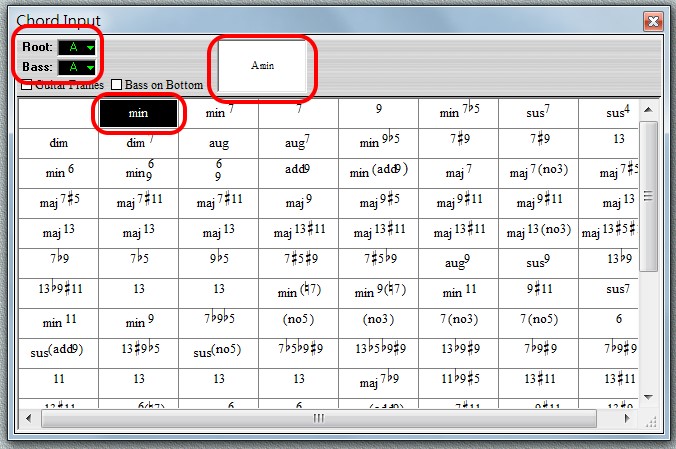
設定和弦綴符 Suffix
>Suffix
在表中,有各種和弦綴符 Suffix,可予設定。
下例是 Am ,注意,在 Overture 中,標示為 Amin。
- Chord Suffix. This is the portion of the chord name that describes the actual pattern of notes that make up the chord, without regard for the root or alternate bass. Examples of suffixes are “mi7” or “sus4”.
設定吉他和弦指法 Guitar Frames
>Guitar Frames
如勾選 Guitar Frames,會出現各種吉他和弦指法。
其實不止吉他,還包括其他彈弦樂器。
若再勾選 Text Only,則只是提示編曲者,插入總譜時,只有「和弦名稱」,沒有指法。
設定低音符號型式 Base on Bottom
如勾選 Base on Bottom 低音符號會以「分母」的型式出現,通常不用。


