

數位音樂 Midi 的要素
數位音樂創作方法
數位音樂創作,當前有 2 大主流方法:
Midi:正規樂器、樂團創作。
Loops/ Samples 電音拼貼創作。
MIDI 的定義與演變 MIDI Definition
MIDI 是 Musical Instrument Digital Interface 的簡稱,直譯為「數位音樂樂器介面」,即強調樂器創作。
最原始的定義為:
1. 數位音樂的一種格式。
2. 數位音樂的硬體、與軟體組合。
現在多指數位編曲的方法與程序。
- A standard for representing musical information in a digital format.
- Software/hardware that conforms to this standard, used for composing and editing electronic music.
MIDI's small storage requirement makes it very desirable as a musical sound source for multimedia applications compared to digitizing actual music. For example, a three-minute MIDI file may take only 20 to 30K, whereas a WAV file (digital audio) could consume up to several megabytes depending on sound quality.
標準 MIDI 樂器 General MIDI / GM
A standard set of 128 sounds for MIDI sound cards and devices (synthesizers, sound modules, etc.). By assigning instruments to specific MIDI patch locations, General MIDI provides a standard way of communicating MIDI sound.
MIDI 後製軟體 MIDI sequencer
A hardware device or software application that allows for the composition, editing and playback of MIDI sound sequences, such as ProTool, CakeWalk.
Media player applications can play MIDI sound files, but creating and modifying MIDI files requires a sequencer.
Here, it is a comparison of current popular sequencers.
MIDI 音色/樂器 MIDI patch
One of 16 channels in a MIDI device. Many keyboard synthesizers and MIDI sound modules can handle several waveforms per patch, mixing different instruments together to create synthetic sounds. Each waveform counts as a MIDI voice. Some sound cards can support two or more waveforms per patch.
MIDI 頻道/個別音色_樂器五線譜 MIDI channel
Most MIDI instruments (synthesizers and sound modules) are capable of generating multiple sounds (instruments) at the same time. Each of these instrument can be assigned to their own channels. The basic MIDI synth has 1 port = 16 channels, but there are also 32 and 64 channel synths available. Channels can be considered as parts in a music score or instruments in an orchestra, or as separate tracks in recording. MIDI sequencers can take advantage of multiple channels, and even multiple synthesizers, creating complex arrangements for bands, even for a large symphonic orchestra.
MIDI 各音色/樂器之聲部 MIDI voices
The number of musical notes that can be played back simultaneously in a MIDI sound device. MIDI provides up to 16 channels of simultaneous playback. The number of voices is the total number of notes from all the instruments played back through all the channels.
For example, if one of the channels (patches) is a piano, up to 10 fingers could strike the keyboard at the same time, generating 10 notes, assuming that particular piano patch triggers only one waveform. Typically, a MIDI sound card will support from 24 to 32 voices. Keyboard synthesizers and sound modules can handle up to 64.
數位化音訊與 MIDI
Digital Audio and MIDI
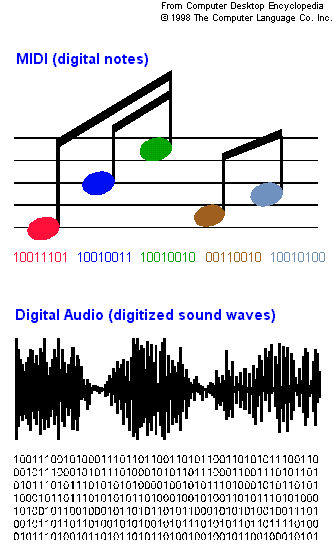
Sound cards play digital audio files and usually support MIDI. Digital audio files contain the actual sound waves that have been converted into digital form. Without compression, they take up considerable storage space. The native digital audio format for Windows is the wave file (.WAV extension). The Mac uses AIFF, and Sun's AU format is used on the Internet.
MIDI files (.MID extension) differ from digital audio, because they contain a coded representation of the musical notes of the instrument; for example, middle C on the piano. MIDI files take up considerably less space than digital audio files, but require a MIDI synthesizer on the sound card.
This shows musical notes stored in MIDI compared to digital audio. MIDI is musical notation, whereas digital audio is a sample of the actual waveforms. This is a conceptual example. The binary coding is not accurate.
There are two kinds of MIDI sound reproduction methods used in sound cards. FM synthesis and Wavetable synthesis (or waveform synthesis).
MIDI FILE
MIDI files or MIDI sequences are special files to store MIDI data created by MIDI sequencers. MIDI files usually have a .mid extension, (unless they are saved in the proprietary extended format of the sequencer program). MIDI files don't contain any sounds (like .WAV files) so in order to play them, you need not only a MIDI player or sequencer program, but also a synthesizer or sound module to generate the sounds. MIDI files only contain performance data, and instructions on what sounds to play. The most widely used format for MIDI files is General MIDI (GM), recognized by most MIDI players and synths. You'll find thousands of GM files on the web, start your search at the MIDIWORLD library.
SOUND MODULE
Sound modules are synthesizers with no built-in keyboards or other triggering devices. Thanks to MIDI, they can be triggered remotely from controllers, like keyboards, computers, even special guitar and wind controllers. One keyboard or computer may control several modules via MIDI cables connected to MIDI ports on both ends.
SYNTHESIZER
Synthesizers come in many shapes and forms, with one thing in common : they all generate sounds electronically. We can differentiate between synthesizers by the method they use to create sounds. Some of them use digitally sampled sounds of other instruments, we call these "sample playback synths". The first synthesizers were based on voltage regulated analog circuitry, using oscillators to create basic waveforms, and alter them by various filters and other modulators to come up with all kinds of unique sounds. There are so many combinations of old an new technolgy, and so many synthesizers, we dedicated an entire website to the subject, please visit Synthman.com. You'll find lots of info on synths, and if you have any synth related questions, feel free to ask at the Synthesizer Forum or the MIDI Forum.
FM Synthesis
A MIDI technique that simulates the sound of musical instruments. It uses operators, typically four of them, which create wave forms or modulate the wave forms. FM synthesis does not create sound as faithfully as wave table synthesis, which uses actual samples of the instruments.
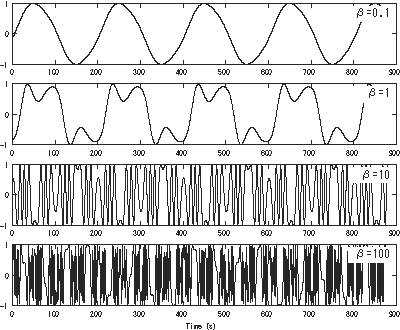
Graphs of various frequency modulated sine waves in the time domain for various modulation indices
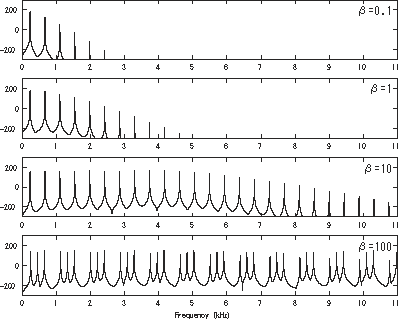
Graphs of frequency modulation spectra for various modulation indices
SAMPLER
Samplers are very similar to synthesizers, with the ability to add or create custom samples. Samples are digitally recorded sounds of actual instruments, human voice or any kind of noise you like. These samples can be triggered from MIDI sequencers or MIDI keyboards.
Wavetable Synthesis
The technique used by MIDI for creating musical sounds by storing digitized samples of the actual instruments. It provides more realistic sound than the FM synthesis method, which generates the sound waves entirely via electronic circuits. The more notes sampled in the wavetables, the better the resulting sound recreation.
The most popular wavetables used to be Yamaha S-YXG and Roland VSC, however, Yamaha has left the market already.
People got used to VSTi instead of soft synthesizer.
Soft Synthesizer: Roland Sound Canvas /Roland VSC-88
Use a Virtual Sound Canvas, if you do not have VSTi.
音源軟體:示範應用: Roland VSC-88
I use to enjoy Yamaha XG (XG is an extension to GM) for its gentle quality, unfortunately, it has been phased out.
我早期是 Yamaha XG 的愛用者,覺得其音色較溫柔,而Roland VSC,不論什麼版本就硬了很多,比較GM中的Voice就非常明顯。可惜的是,Yamaha早早就退出了市場。
MIDI 創作軟體
Software with MIDI Production
We are using the following software to accomplish the steps of MIDI production for this course.
數位音樂創作會應用到的軟體,包括以下幾種類型:
Scorewriter/ Notation Software : Overture
MIDI 軟體創作就是使用打譜軟體,以總譜方式,直接輸出各種樂器的聲音。
打譜軟體:示範應用: Overture
Music Editor/Midi Sequencer: Sonar
音樂錄音、混音等「後製作」軟體,又習稱編曲軟體。
Recording, Mixing, and Post Production
編曲軟體:示範應用: Sonar
File transformation: CDex
轉檔軟體:示範應用: CDex


MIDI 創作硬體
MIDI 創作硬體簡單可以分作3部分:
MIDI 輸入鍵盤 MIDI KEYBOARD
MIDI 硬體創作經常使用輸入鍵盤 MIDI KEYBOARD,模擬各種樂器。
在科技發展下,更多數位實體樂器 Digital Physical Instruments 也已問世了。
MIDI 輸入鍵盤的中文也稱為主控鍵盤,相關細節可參考本連結。
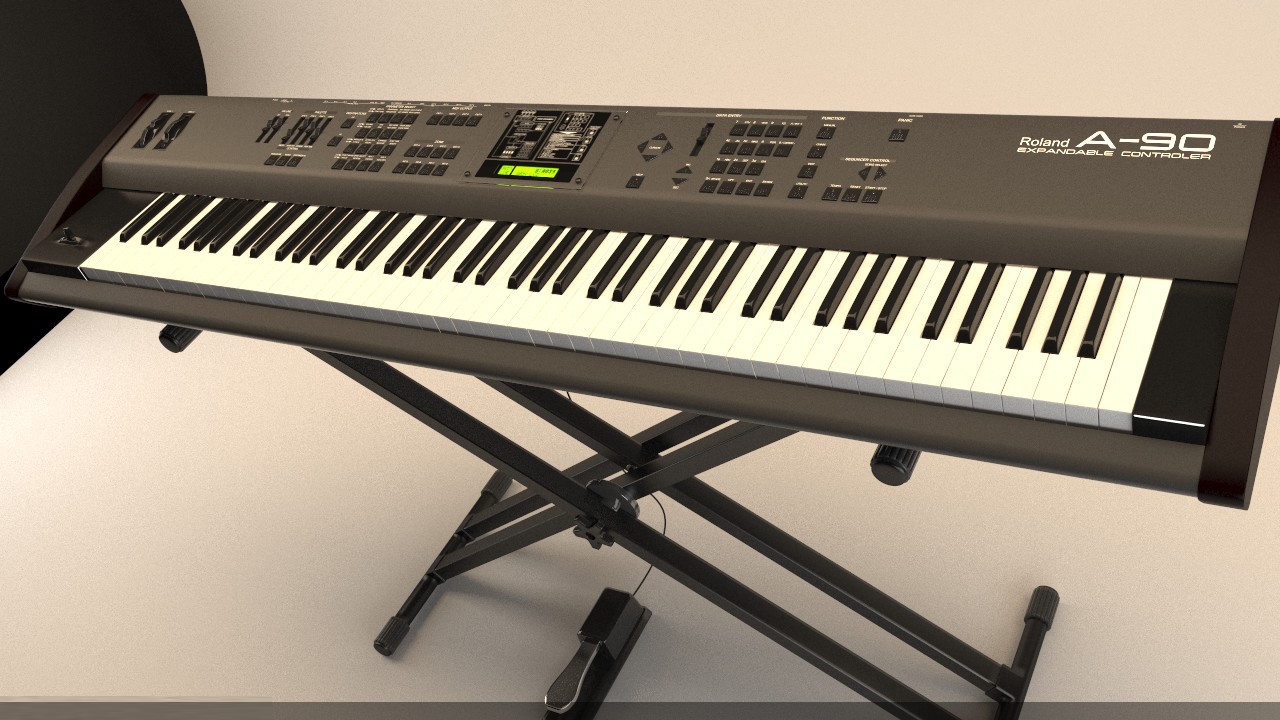
上圖是統雄老師的第一臺MIDI 輸入鍵盤 Roland A-90,曾經風行一時。
數位音訊工作站 DAW
數位音訊工作站 DAW 其實就是一套包括:錄音功能、數位化音訊轉換、音色音源、與效果混音能力的電腦,通常也搭配相關軟體。
MIDI 周邊設備
MIDI 周邊設備請參考以下相關英文文獻。
輸入鍵盤 MIDI KEYBOARD
MIDI controller keyboards are electronic keyboards, designed to trigger sounds in synthesizers and sound modules, as well as to enter notes into MIDI sequencers. There's a microswitch under each key connected to a MIDI processor. It will sense what keys are pressed, how long they are held, and sends this data to other devices. Velocity sensitive keyboards will also sense how hard the keys are pressed, to add dynamics to the note data. Some keyboards have an extra sensor for aftertouch, for added expression. When the key is held down, you can apply more pressure to trigger the aftertouch sensor. This aftertouch data can be used to alter the sound (i.e. add vibrato). Most controller keyboards are also equipped with pitch and modwheel and various other knobs, sliders and buttons to send MIDI data, such as program change, and other assignable control messages to the receiving MIDI devices. MIDI controller keyboard usuall don't come with built in sounds, (if the do, they are called synthesizers).
數位音訊工作站 DAW
DAW (digital audio workstation) is an electronic system designed to record, edit
and play back digital audio. A key feature of DAWs is the ability to freely
manipulate recorded sounds. Many DAWs, especially computer-based DAWs, have MIDI
recording, editing, and playback capabilities.
The term "DAW" simply refers to a general combination of audio multitrack
software and high-quality audio hardware — the latter being a specialized audio
converter unit which performs some variety of analog-to-digital (ADC) and/or
digital-to-analog (DAC) signal conversion. For example, a workstation could have
eight discrete audio inputs, and two or more audio outputs for playback
monitoring or routing signal to other devices. Systems can have as few as two
mono inputs and outputs; the discrete audio inputs and outputs provide for
simultaneous multitracking dual mono sources or stereo recording. A professional
DAC performs the same function as a common sound card, but is generally of
higher quality and offers sonic or functional advantages when compared with its
consumer cousin. (Source:wiki)
Sound Card
Also called a "sound board" or "audio adapter," it is a computer expansion board that records and plays back sound, providing inputs from a microphone or other sound source and outputs to speakers or an external amplifier. The de facto standard for sound card compatibility in PCs is Creative Labs' Sound Blaster.
MIDI 周邊設備
MIDI ADAPTER
The Sound Card MIDI Adapter Cable is a special cable designed to connect MIDI devices to the joystick port of MIDI capable sound cards. Many new computers are sold without sound cards, and not all sound cards are MIDI capable, so having a joystick port on your computer doesn't necessarily mean that you can connect MIDI devices to it. Before you buy a MIDI adapter cable, check your computer if it's equipped with the proper sound card.
MIDI CABLE
The standard cable to connect MIDI devices. Comes in various lenghts, (normally between 1 and 20 feet) with 5-pin DIN connectors on both ends.
MIDI CONTROLLER
MIDI controllers are electronic devices capable of generating and sending MIDI data. The most commonly used controllers are MIDI keyboards. There are also many different controllers available for sending various MIDI control messages to synthesizers and sound modules, as well as MIDI sequencers. These devices are used for controlling volume on multiple tracks, and to change sounds, etc. See MIDI data for details.
MIDI COUPLER
Commonly used for connecting standard MIDI cables to each-other, to create an extension. This is what you need to make a 10ft. cable out of two 5ft. cables.
MIDI DATA
MIDI data is the information transmitted by MIDI devices. It includes the note names (i.e.C#4, F5, etc.), note duration, velocity, volume, program change, and many other performance control messages. MIDI data can be transmitted directly from controllers to synthesizers and sound modules, or recorded to MIDI sequencers, edited and played back on synths and sound modules.
MIDI DEVICE
Any hardware or software synthesizer, sampler, sound module, drum machine, interface, controller, etc., capable to send and/or receive MIDI data.
MIDI IN, OUT, THRU
MIDI IN, OUT and THRU are the names of MIDI ports on MIDI devices. The MIDI IN port is used to receive MIDI data from the OUT or THRU port of other devices. THE MIDI OUT port is for sending data to the IN port of other devices, and the THRU port provides an extra connection for additional devices. The THRU port will simply pass on the data received from the IN port to other devices, while the OUT port will only send data generated by the device.
MIDI PORT
MIDI ports are the 5-pin connectors on MIDI devices labeled as MIDI IN, MIDI OUT and MIDI THRU. Each MIDI port can transfer 16 discrete channels of MIDI data, controlling as many instruments on one or more modules. The use of computers and MIDI sequencers allow the use of multiple MIDI ports, controlling lots of instruments on lots of modules at the same time thru MIDI interfaces. It's like having a band, an orchestra, and then some...
MIDISPORT
Midisport is a popular line of USB MIDI Interfaces by Midiman / M-Audio.
MPU-401 and USB
The MPU-401, where MPU stands for MIDI Processing Unit, is an important but now obsolescent standard for MIDI interfaces on the PC platform. It was designed by the Roland Corporation, which also co-authored the MIDI standard. Released around 1984, the original MPU-401 was a board to be inserted into a computer and an external box with connectors and some processing intelligence intended to offload the CPU.
The current trend in MIDI world is to use the USB interface, and a USB to MIDI converter in order to drive musical peripherals which do not yet have their own USB ports. Often, peripherals are able to accept MIDI input through USB and route it to the traditional DIN connectors.
DIN connector
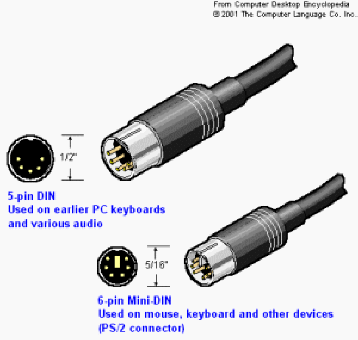
(Deutsches Institut fur Normung connector; German Standards Institute connector) A family of plugs and sockets used to connect mice and keyboards to the computer. It is also widely used in the audio world. The smaller 6-pin Mini-DIN connects today's keyboards and mice, while earlier keyboards used the larger 5-pin DIN, and earlier mice used the serial port. The 6-pin plug was first used on IBM's PS/2 and was called a "PS/2 connector." Newer keyboards can be plugged into older computers with a 6-pin to 5-pin adapter (PS/2-AT adapter), and older keyboards can plug into newer computers with 5-pin to 6-pin adapters (AT-PS/2 adapter).
MIDI Input Methods
Keyboard or Virtual Instruments
Score Software
Loops Mixing
Links


