

數位樂譜 Overture 記譜法
命令列與小節設定 Command Bar and Measuers Settings
Overture 進階記譜法 Advanced Notation Methods - Measures 小節設定 - Overture 編曲一般設定 Tips for Overture's General Preferences
Overture 編曲進階記譜法 Advanced Notation Methods
Overture 命令列提供各種編曲進階記譜法,其中最重要的為小節設定 Measures Settings。
Measures Settings 小節設定
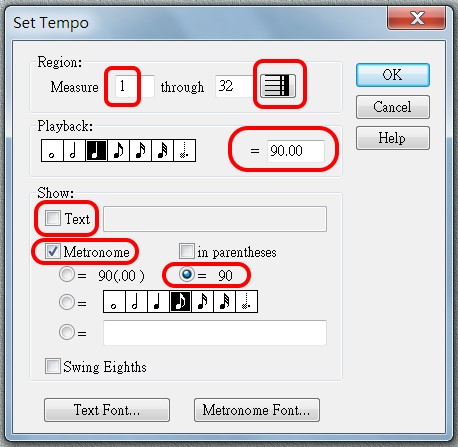
>Set Tempo 速度設定
Region 區域
注意起始,如果全曲同述,則起點設第一小節,結束按「最後小節圖示」。
Playback 速度標誌
Playback 速度標誌常以 4 分音符作 1 拍為準,每分鐘拍數。
Metronome 在樂譜顯示速度
>Metonome 與 Playback 同步,除非有特別設計,才用 >Text
V5: Metoneme 的預設字形為 Aloisen (五線譜專用字型),不能顯示數字,故要改字型、或 <Text Font> 的字型。。
 旋律潤飾:Overture 的圖形視窗與鋼琴軸檢視
>Set Key Signature 調設定
可移調。
>Set Time Signature 拍子設定
拍子的呈現方式,稱為 Meter,分為3 類:
主要/簡單節拍 Main/Simpe Meters
主要 Main Meters 節拍,也稱為簡單 Simpe Meters,就是:4/4, 2/2, 3/4 等。但也可以是創意拍如下。
7/4:表示每小節 7 拍。
除了數字符號,還有圖示符號如下:
 :Common Time,就是 4/4。
 :Cut Time,表示 Common Time 切一半、即雖是 4/4,但速度快一部,這是古老的習慣,就是 2/2。
複合節拍 Compound Meters
每 3 拍子為 1 組的情形,如: 6/8, 9/8, 6/16 etc.
組合節拍 Composite Meters
組合 2 個以上的簡單 Meters、或複合 Compound Meters,符號會用加號連結。
7/4:不再是每小節 7 拍。而是如 4/4 + 3/4 、 3/4 + 4/4 、 2/4 + 3/4 + 2/4。
延申閱讀。
V5: Set Time Signature 事後變化拍子設定
如果在譜寫好後,事後再想設計其中部分作為變化拍子,有一些特殊技巧。
延長記號改為變化拍子
延長記號可對該 track 產生效果,但如是多樂器編曲,宜改為變化拍子。

刪除延長記號,並在後方增加1空白小節。

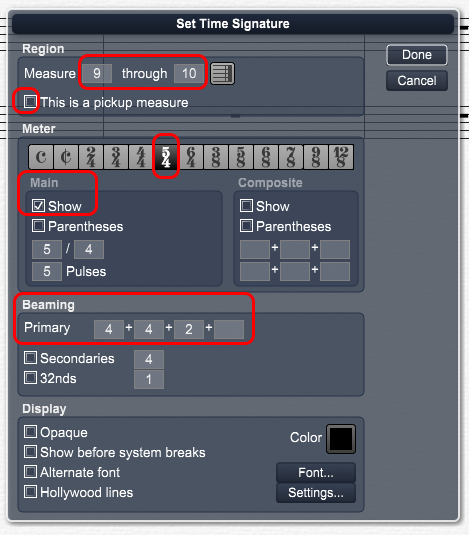
>Set Time Signature
設定範圍為 9 through 10(即新增空白小節)。
pickup measure 為前置定速小節,通常為打擊樂器,同時錄音時,不會被錄製。
選擇 5/4。
勾選顯示主要 Main Meters 節拍。
Beaming 符槓設定
連結 8 分音符或更短的橫槓。
Primary Beam 主符槓
如上圖的「高」、「山哪」,最上方的符槓,必定連續。
由於以8 分音符為單位,所以 5/4 最少有 10 種組合方式。OT 會預設為 Compound Meters 優先,亦即 3 的倍數,會出現 6+4,如果輸入新音符,便如此安排。
本曲並未要變化為 Compound Meters,所以改成:4+4+2。
Secondary Beam 次符槓
如上圖的「高」的第二個 16 分音符,為不連續槓。
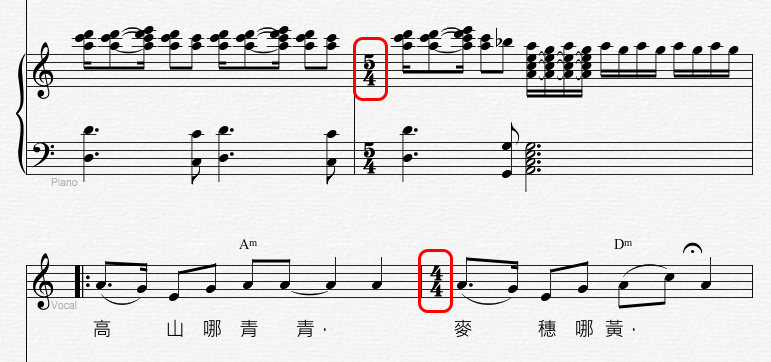
完成結果如下。因前1小節也是 5/4,故符號出現在前節,後1小節,會自動出現原拍子,即 4/4。
>Set Coda, Segnos, etc 反復記號設定
D.C 是反復從頭開始; D.S 是反復從記號(Segno)開始。
通常「第三次反復」+「跳過 To Coda 之後小節,直接到 Coda」,使用法:
Segno - To Coda - D.S al Coda - Coda
D.S. al fine 則從記號處再演奏至「Fine」或「延長」記號(不標在音符上)時終結全曲。
 To
Coda 不能和正常反復記號 |: 配合使用。
To
Coda 不能和正常反復記號 |: 配合使用。
>Set Measure Numbers 小節編號設定
如果在任
1 小節,<Start Number>輸入錯誤數字,會導致包括歌詞輸入等不可預知之錯誤。
>Increase/ Decrease Measures on System 改變單列小節數
這個對於避免最後一行成為零頭小節,特別有用。
>Rebar
整個樂譜按空間,重新計算小節。如非特殊情形,不必使用。
Command Bar 命令列
Score
>Insert Track
>Delete Track
>Setup Track
Edit
>Slect
>Current Track
>Set Color
Mark 住任何物件,可以設定顏色。
Options
>Preferences
>Drag Notes Chromatically 設定半音移動才有彈性。否則會被原始調性鎖死。
正確性檢查
>Show
>Incorrect Rhythms
>Range Errors
Tool Bars
>Note Palette
>Group Palette
>Transport Controls/ play
Status Bar
>View
>Voice
最多有有8聲部。All 為同時顯現;或指定某部以編輯。
8聲部之音符顏色不同,若需改設,可使用 Edit 命令之 Set Color。
Overture 編曲一般設定
Tips for Overture's General Preferences
Overture 編曲一般設定如下圖。
To drag notes chromatically 半音階編曲
1. Choose Options>Preferences.
Overture opens the Preferences dialog box.
2. In the Preferences dialog box, select General from the Preference Type
pop-up menu.
3. Click the Drag Notes Chromatically check box to check it.

Duration and Legato control 時值與圓滑音控制
Use Graphic Window
>Notes >Modify
<Set> <Duration> to 'units'
A full quarter = 480 units, default = 430 units
When modify measure 小節寬度-不要自動調整
V5 旋律編修
Options > Auto 設定-不要 Space Notes, Fill Rest
Space Notes, Fill Rest 會無法移動音符、刪不掉休止符,造成非常大困擾!
Do not check the followings:
Options > Auto > Justify
Otherwise, it will make changes all the time and make you dizzy.
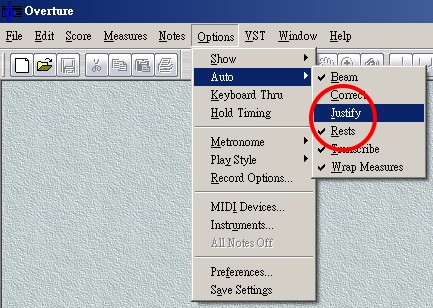
Options > Auto > Rests
It depends whether you want to check it.
It is fine to remain checked to enter new notes.
Auto Save Score
V 5.0 新增自動儲存功能,預設為 C: 下,會被 Windows 一直阻擋,應改到 D: 下。
同時,編完後,必須存回專用目錄。
簡捷學習:直接前往「和聲與和弦分析自然和聲:共鳴樂音與自然音階」
專題
圖形視窗 Piano Roll View
歌詞視窗 Lyric Window
和弦視窗 Chords Window
 樂器發音應用
Articulations
樂器發音應用
Articulations


