

圖形視窗/琴軸檢視//數據檢視
|
音樂五要素
:旋律、和聲
(和弦,
對位)、節奏、配器 、曲式。 加上數位科技。 |
V5 : Data View 數據檢視
V5 : Data View 的數據檢視,是 V4 的圖形視窗與鋼琴軸檢視 Piano Roll View,再新增錄音軟體的基本 Track Data View 音軌數據檢視。V4 的 Track View 部分功能,如總譜的排列順序,也改到此處。
左上>Score View Button
Score View 和 Data View 互為切換鍵 toggle。
Data View 數據檢視再分為上下 2 區域。

Track View and Track List Pane 音軌檢視
上半部是 Track View,其左側為 Track List Pane。
圖形檢視//圖形視窗
下半部是 Graphic View 圖形檢視,V4 稱為圖形視窗。
V4: Windows> 開啟圖形視窗。
圖形檢視//圖形視窗再分為 3 部分:左側是 information area view 資訊區檢視,V4 稱為 Tool Bar 工具列,右上是 Note Data pane 音符區格,右下是 Controller pane 控制器區格。
Note Data pane 音符區格,可切換 toggle 鋼琴軸檢視或五綫譜檢視。
鋼琴軸檢視,亦即以鋼琴鍵盤為列,表示音高,而以平行柱式的音圖,表現音值與複音間的彼此關係,並以小節區隔。
Info Area 資訊區//Tool Bar 工具列
Selection tool 工具選擇
 Warning: It is not suggested using this tool since it requires heavy
resources. Use Pencil tool instead.
Warning: It is not suggested using this tool since it requires heavy
resources. Use Pencil tool instead.
Pencil tool 鉛筆工具
Change the start time Drag the left edge of the note in either direction. The
note duration stays the same, but the start time is shifted.
Change the pitch Drag the middle of the note up or down.
Change the duration Drag the right edge of the note in either direction.
Draw a custom curve indicating changes in controller value.
Line tool 線性工具
Draw a straight line indicating a steady increase or decrease in controller value.
Erase tool 橡皮擦工具
Erase controller changes already in place.
Scrub tool 手動播放工具
Press and hold the left mouse button in the Graphics window. Overture displays a vertical line and plays any notes that are underneath the line.
Note Pane 音符區格
Note Pane 音符區格主要控制時值表現,而 Controllers Pane 控制器區格最常用的是 Velocity 壓力表現。
頂端左方是工具列,右方顯示「最短音符」、與頻道。
時值表現
注意:鉛筆工具點音圖的左側,可移動音起始的位置;點右側,可修訂音的長度,以「擬人性化」,亦即可避免「刻板對齊」。
The Note pane is full-size and the Controllers pane is hidden at the bottom. Drag the gray splitter bar up to display the Controllers pane.
Controllers Pane 控制器區格
為下拉選單主選單為廣義的 Controllers,共有7個,預設為 Velocity Pane 壓力表現。
而第二個選項 Controllers 為狹義的MIDI Controller Values 其他效果。
The Controllers pane, the lower half of the Graphics window, lets you edit MIDI, controller, velocity, and pitch wheel data.
2 區格名稱
上方:Piano Roll / Note Pane 顯示音符的圖形編輯區。
下方:Controller Lane / Controller Pane 顯示 Velocity、CC1、CC7、CC11 等 MIDI controller 資料的畫線區。
 畫線格消失
Debug
畫線格消失
Debug
若 Controller Lane 的那一整塊區域突然消失,是該區域高度縮到 0。
把滑鼠移到 Graphic Window 的最下緣,慢慢移動。 當游標變成: ↕ 可上下調整,就按住滑鼠往上拖。 畫線格就會重新出現。
Velocity Pane 壓力表現
真實樂器的Velocity 壓力表現,影響深遠。
這裡雖以「彈鍵」的手指壓力示意,但配合吹、拉、打…樂器,都有相同效果。
The duration of the notes will affect the thickness of the line of the velocity, therefore, affect the quality of the patch.
You want to use the pencil to modify the notes and the lines.
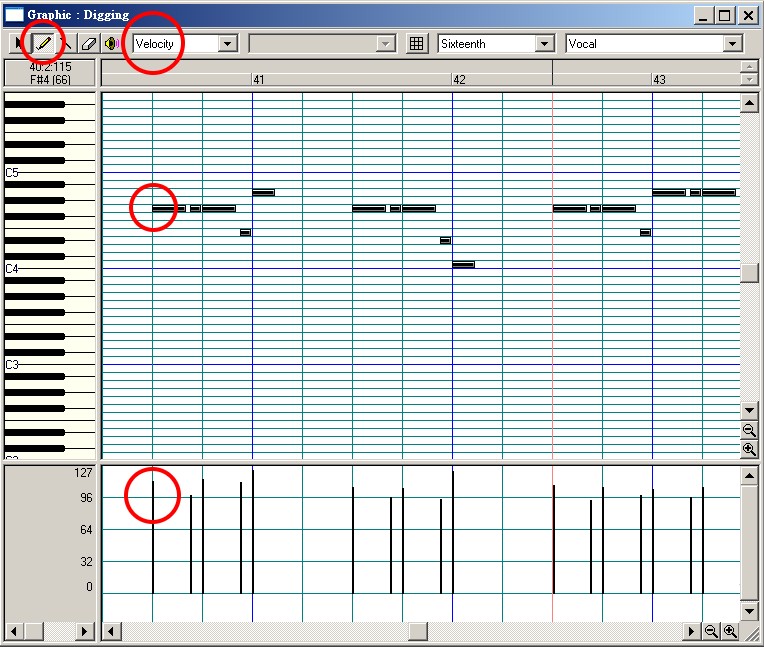
匯入 Midi 檔不顯示 Patch
匯入 Midi 檔,在 Track Window 上有可能不顯示 Patch,而顯示 none,但其實有音色,要知道原來如何配器,可以看 Graphic Window 的右上角樂器名稱,但如果還是顯示 text ,如 Vocal,那就必須下載 Midi 編輯器如 Sekaiju、MidiEditor,或上傳線上檢視器 MIDI Inspector。
此進階作法,請回到Track Window 的音色設定:進階。。
MIDI Controller ChangeMIDI 控制器變更
MIDI 的 CC(Control Change) 是一組 0–127 的連續控制資料,,通常會與參數編號(CC Number)搭配使用。
在 Overture 4 裡,你可以把它畫成一條曲線,各種
Controller Change 的使用,與 Velocity 相同。幾個重要效果如下。
CC1 Modulation 常由音源指定為 dynamics/音色變化 先不要用,確認 MuseSounds mapping
CC7
Channel Volume 一個 MIDI channel 的基本/總體音量 設定基準/headroom
CC10 Pan 左右聲道位置 視需要
CC11 Expression 演奏中的連續音量表情 你的主要動態工具
CC14 Pitch Bend Wheel 彎音輪的 MIDI CC 替代編號
CC64 Sustain 延音踏板 鋼琴等
CC91 Effect
1 Depth 效果器深度;GM 常配置為 Reverb 不要直接當 Reverb 使用
CC7:基本音量/天花板
這是 Overture「Track/Volume Window」所對應的核心概念。
CC7 = 0–127
即這個聲部最多允許多大聲,因已在Track Window 中每個 channel 設定,這裡可不再做。
CC11:Expression—段落音量控制
在 CC7 所提供的範圍內,連續改變實際演奏音量。CC11 不會把音量推到超過 CC7 所設定的上限。CC11 是在 CC7 的基礎上做
Expression scaling,而不是把 CC7 往上突破。
可以粗略理解成:
所以對 CC11 的 127
是個【相對值】,不必去構想其絕對值。重要!
MIDI Association 引用的 General MIDI 公式是:
Gain(dB) = 40 log₁₀(CC7/127) + 40 log₁₀(CC11/127) MIDI.org
也就是說,兩者是乘法式地共同作用:
CC7 決定 Channel Volume 的基準
CC11 決定這個基準的 Expression 比例
因此:
CC11 = 127 = 100% Expression
而不是:
「CC11 = 127
就代表某個固定的絕對音量。」
MIDI Association 也明確列出 General MIDI 的初始化標準:CC7 = 100,CC11
= 127。
假設:
CC7 = 80
那麼:
- CC11 = 127 →
100% 的 Expression
- CC11 = 64 → 約 50% 的 Expression
- CC11 = 32 → 約 25%
的 Expression
所以 CC11 的 127 是「完全不衰減」,不是「絕對音量 127」。
CC11
不可間斷
CC11,若要畫,要從頭到尾。如果出現空白,下次音符出現,是以上一個畫線的結尾音量為準,所以,如果中間音量降為無或低,接下去空白處會變成無聲。若要再拉回標準CC7,CC11
必須從開始音定為127。
CC64 鋼琴踏板
左上小白窗選“Control”,緊挨者的小白窗選“64-pedal(sustain)”,然後用小畫筆在下面的編輯區域點擊,點“0”以上的地方出現豎線,點 “0”以下的地方則出現小點,豎線表示踩踏板,小點表示放踏板。
注意:若全部延音,會形成惱人的嗡音。
CC1 Modulation波浪式顫音
左小白窗選“Control”,緊挨者的小白窗選“1-Modulation”,然後用畫筆在下面編輯區畫即可。這種音響適用於小提琴等樂器拖長音時的修飾。
CC14 Pitch Bend Wheel 彎音
與其使用CC14,不如使用標準的彎音輪(Pitch Bend),在 MIDI 規格中擁有獨立的高解析度 Channel Voice Message,稱為 Pitch Bend(非一般 0-127 的 CC 訊號),與 Control Change 同一層級。
左上小白窗選“Pitch Bend”,然後用畫筆在下面編輯區畫即可。這種音響適用於模仿電吉他推弦技巧。
MIDI hardware and software use controllers, special types of events, to control the details of how MIDI music is played. They use automation data to adjust volume, pan, and other parameters of MIDI and audio tracks on the fly while playback is in progress. Overture lets you enter or edit controller and automation data using the Controllers pane in the Graphic window.
Controllers are the pedals, knobs, and wheels on your electronic instrument
that you use to change the sound while you're playing. For example, a
sustain pedal and a modulation wheel are two controllers commonly found on
keyboards.
The Graphic window toolbar contains two drop-down lists, Data type and
Controller, that let you choose the controller or data you want to see and
edit. The contents of these lists depend on the port and channel settings
and on the instrument assigned to that port and channel. Different
instruments use controllers in different ways. Overture lets you use
instrument definitions to define the names that go with each controller
number.
Data Type
Overture lets you display and edit several other types of data the same way you do controller data. These data depend on your port and channel settings and on the instruments assigned to them. The may include, for example:
Velocity. MIDI note velocities
Wheel. MIDI pitch wheel or pitch-bend messages
ChanAft. MIDI channel aftertouch (ChanAft) values
Control. MIDI Controller values
Tempo. Song tempos
A MIDI keyboard responds in two ways to the player's touch on the keys. The
first is velocity sensitivity. The faster the player presses a key down, the
higher the velocity data produced. To the player, it feels like he or she is
playing the keys harder, not faster, but the result is the same.
The velocity data is most commonly used to increase the level of the sound
with harder playing, and also to increase the brightness of the sound, as
would happen in an acoustic instrument.
Once a key is played and held down, there is also 'aftertouch', more
properly known as 'pressure'. The player can exert more pressure on the key
while it is down; this data is used to control typically a vibrato effect,
level or perhaps brightness - it depends on how the tone generator is
programmed.
But aftertouch or pressure works in two ways. One is 'channel pressure',
where the keyboard senses the pressures of all of the keys held down and
generates one set of data to cover them all. Usually this is the pressure of
the hardest-pressed key.
So with channel pressure, you couldn't press one key hard and another gently
and get different results for each key. Channel pressure covers the whole of
the keyboard (or the whole of one MIDI channel).
Polyphonic pressure or aftertouch however works on individual keys. So all
the subtleties of your playing are maintained, and if this data is used to
control vibrato, then each note held down can have a different amount of
vibrato.
The problem with polyphonic pressure is that it generates a tremendous
amount of data. Even channel pressure generates a lot because it constantly
changes. A pair of note-on and note-off messages comprises a mere six bytes,
but channel pressure varies every time the player changes pressure on the
keys. Polyphonic pressure multiplies this data by up to ten (ten fingers!).
The standard MIDI system can only transmit about 30 kilobits of data per
second, and polyphonic pressure can easily push against this limit. Try
adding more data, such as additional channels, and the whole of the MIDI
data stream will slow down.


